 Kempt
Clear space without the guesswork.
Kempt shows what fills your disk and tells you what each folder is. It cleans only what apps rebuild by themselves, and it sorts the rest of your files. Nothing goes until you have looked at it.
- Free scan of your whole disk, no account needed
- Your files go to the Trash or Recycle Bin first
- Runs on your computer. Nothing is uploaded
- Safe to clean
- Check first
- Breaks an app
- Your files
- Protected
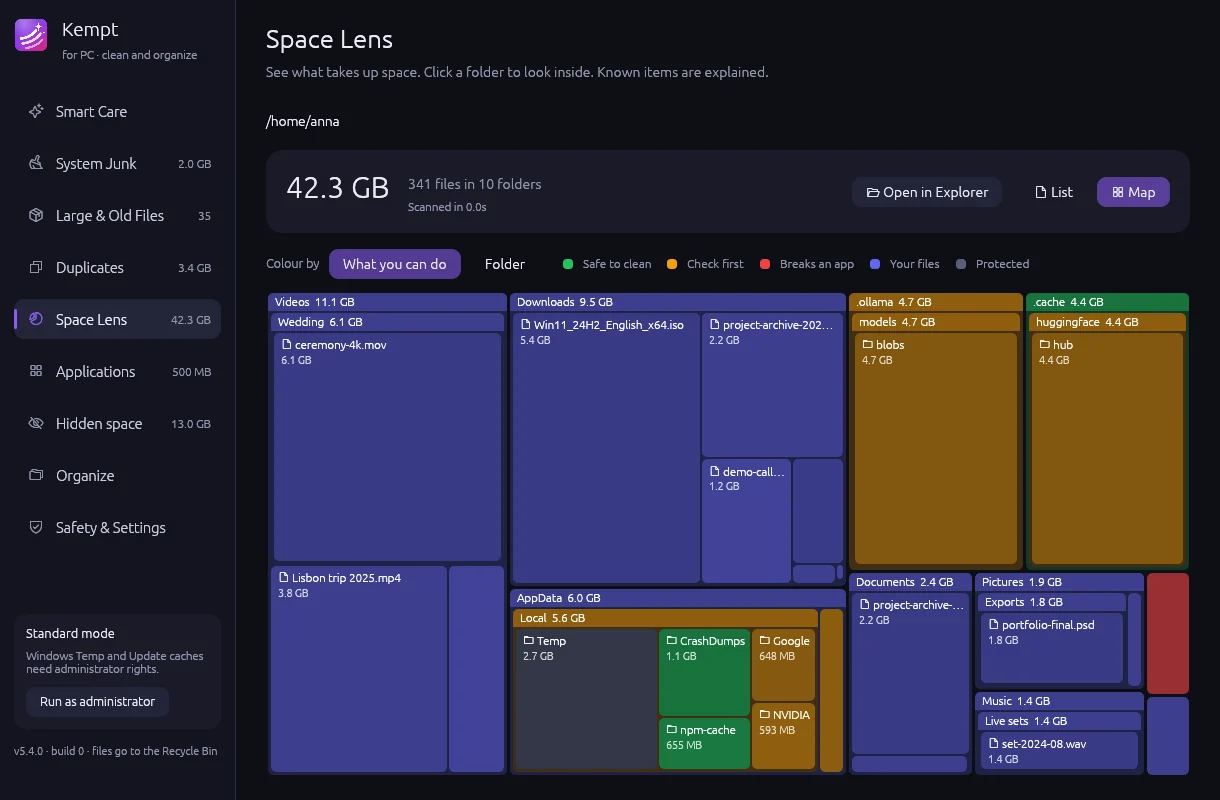
Every folder gets a colour that tells you what to do with it.
Disk maps show what is big. Kempt also shows what is safe. It knows hundreds of folders by name: caches, build data, backups, virtual disks, app data. When it does not know a folder, it treats it as yours and leaves it alone.
Safe to clean
Caches, temporary files and build data. Apps make them again when they need them.
Check first
Old backups, installers and downloads. Useful to some people, junk to others. You decide.
Breaks an app
Docker disks, Linux systems, app libraries. Kempt explains the safe way to make them smaller.
Your files
Documents, photos and videos. Never selected for you. Shown so you can decide.
Protected
The system, your apps and your photo library. Kempt does not let you remove them.
One scan, then one review.
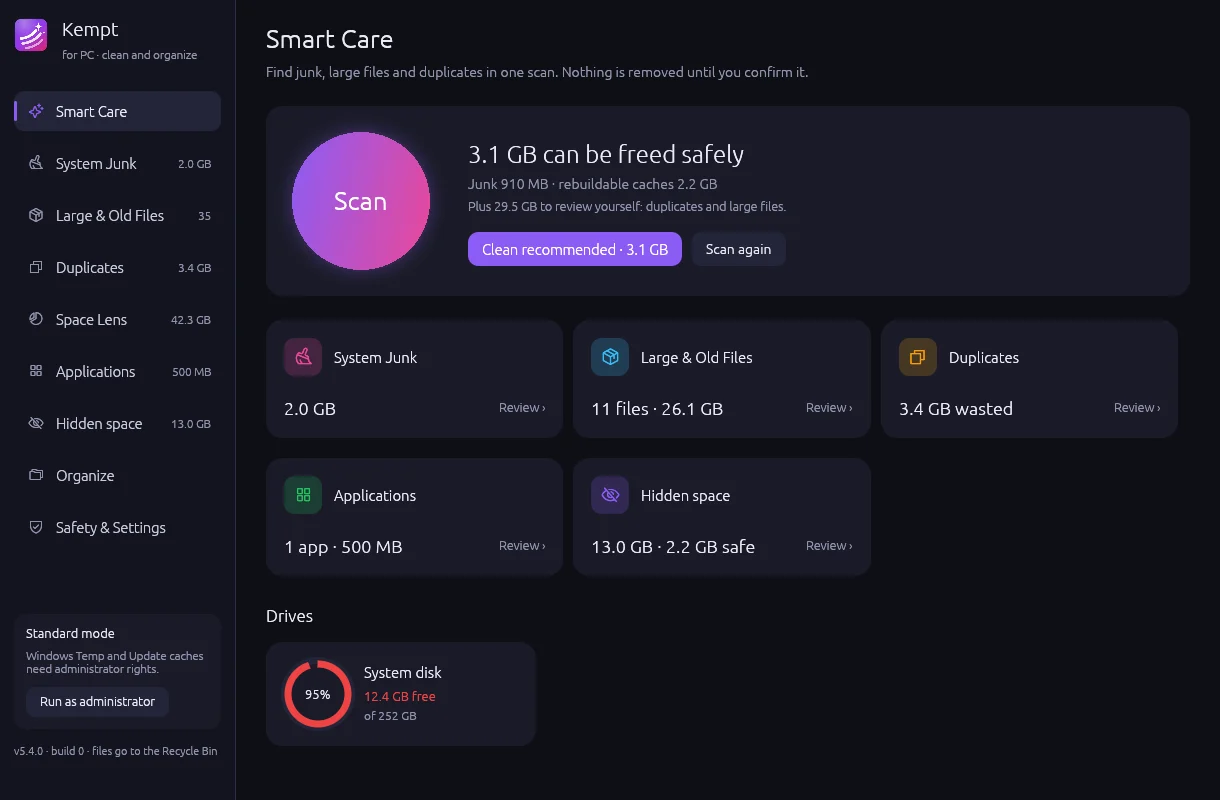
Smart Care looks at junk, large files, duplicates, apps and hidden folders at the same time. It adds up what is safe to clean and puts everything in one list. Untick what you want to keep, and Kempt does not suggest it again.
- Junk and rebuildable caches in one click
- Duplicates and large files left for you to decide
- A log of every file it removes
See inside every folder.
Space Lens draws your disk as boxes inside boxes, so a big folder shows what is inside it straight away. A red folder can hold a green cache: you see both, and you remove only the part that is safe.
- Click a box to look inside it
- Hover for a plain explanation
- Right-click to show it in Finder or Explorer
Sort a folder you gave up on.
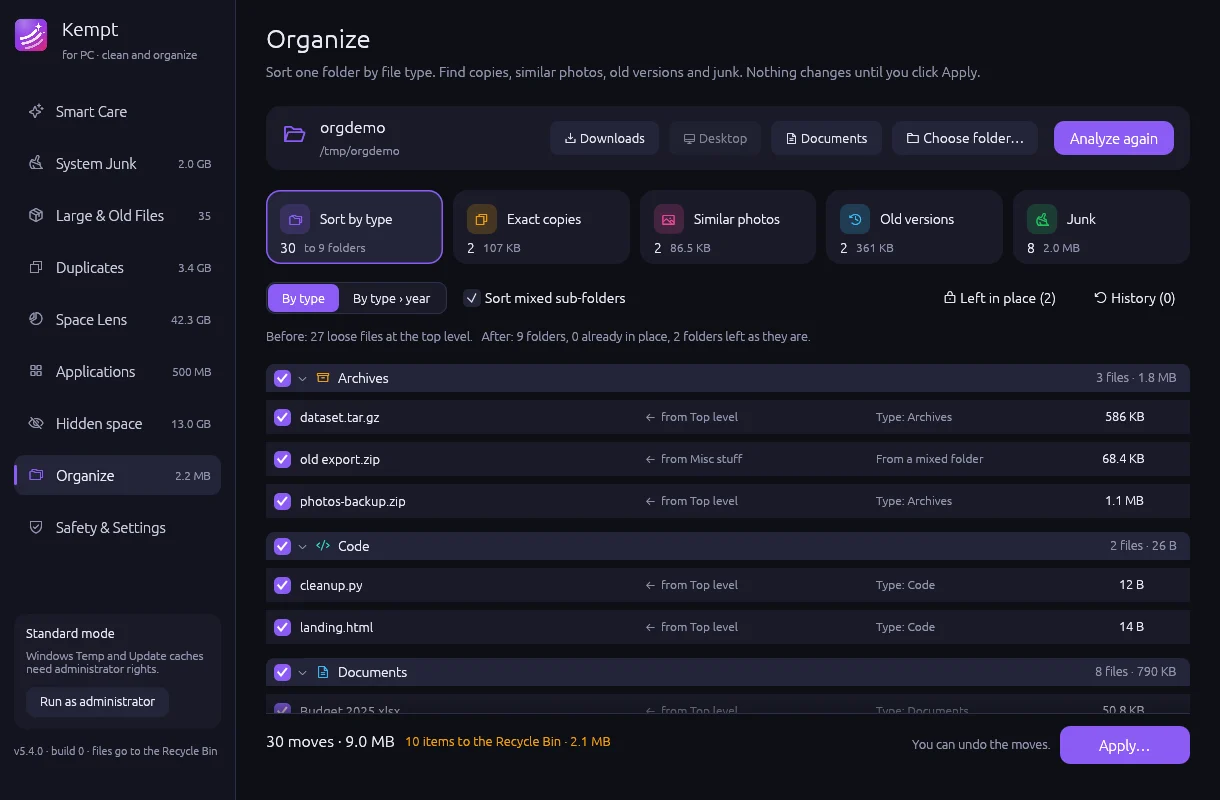
Point Organize at Downloads, Desktop or any folder. It finds copies with different names, photos that are almost the same, old versions of a document and leftover junk. Then it proposes a tidy layout by type or by year.
- You see the plan before anything moves
- Project folders and folders you already sorted stay as they are
- Every run can be undone
Also in Kempt
Apps and their leftovers
See every app with its size and the files it keeps elsewhere. Remove an app and its leftovers in one step.
Hidden space
Dot-folders, app data, developer tools and local AI models, each one explained, with the ones that are safe marked.
Duplicates
Exact copies found by content, not by name. Kempt always keeps at least one copy.
Large and old files
Filter by size, age and type. Old installers and forgotten videos rise to the top.
Developer clean-up
npm, Cargo, Gradle, Xcode and simulator data. On a PC also WSL disks, which Kempt can compact safely.
Signed updates
Kempt updates itself. Each update has a digital signature, and Kempt checks it before installing.
The rules Kempt follows
- Nothing goes without your reviewYou see every item first. Untick any item to keep it.
- Your files go to the Trash or Recycle BinYou can put them back. Only caches and temporary files are removed directly, because apps rebuild them.
- System and app files are protectedThe system, your apps and your photo library cannot be selected at all.
- Files are checked again before removalIf a file changed since the scan, Kempt skips it.
Pay for the computers you clean.
Every plan includes every feature. One license works on Mac and PC.
Personal
1 computer
- Unlimited cleaning
- Organize with undo
- Every update while you subscribe
- 12 months of updates included
Home
3 computers
- Everything in Personal
- Mix Macs and PCs
- Every update while you subscribe
- 12 months of updates included
Family
5 computers
- Everything in Home
- Move a license to a new computer any time
- Every update while you subscribe
- 12 months of updates included
The free version scans everything, shows the full map and cleans up to 2 GB, so you can see how it works on your own computer first. Lifetime licenses keep working forever; after 12 months, an update pass is optional.
Questions
Can Kempt delete something I need?
Kempt never removes a file without your review, and your own files go to the Trash or Recycle Bin, where you can restore them. System files, apps and your photo library are protected and cannot be selected. Before it removes anything, Kempt checks again that the file has not changed since the scan.
Does Kempt upload my files or collect data?
No. Kempt works on your computer. It contacts the internet only to check for updates and, if you buy a license, to confirm the license.
Why does my Mac or PC show a warning when I open it the first time?
Apple and Microsoft show a warning for apps from small, independent developers. The install help shows the two clicks to open Kempt. You do this one time only.
Does one license work on Mac and PC?
Yes. A license counts computers, not platforms. The Home plan covers three computers, for example two Macs and one PC.
What does the free version include?
The full scan, Space Lens, Organize previews and every explanation. It cleans up to 2 GB in total. A license removes the limit.
What is the difference between yearly and lifetime?
Yearly includes every update while you subscribe. Lifetime is paid once and keeps working forever; it includes 12 months of updates, then an optional update pass.
Which systems does Kempt support?
macOS 13 or later on Apple silicon and Intel, and Windows 10 or 11.